



ASWAQ6 : Sales and Customers
ASWAQ6 features a powerful Sales Management System
It supports all the essential functions and workflows required to monitor sales activities, control pricing, and enforce sales terms — all within a unified and efficient environment.
Multiple Pricing Policies for Full Control Over Item and Service Prices
ASWAQ6 offers extensive pricing features. You can define up to five pricing levels per item or per unit of measure and link these pricing levels to specific customers. The system automatically applies the correct price when creating sales documents.
Seasonal pricing can also be configured to support promotional campaigns or discount periods.
Pricing Controls within the Customer File – ASWAQ6
The system allows item-specific pricing agreements with selected customers for contractual periods. It also offers advanced discount control settings — per item, customer, or salesperson — ensuring sales team compliance.
Minimum selling prices or profit margin thresholds can be enforced, preventing transactions that fall below defined limits.
Sales prices can be calculated automatically based on desired profit margins or in relation to other prices, simplifying seasonal updates and bulk pricing adjustments.
Set Sales Targets and Track Progress
Sales goals can be defined per customer, per salesperson, and per item. ASWAQ6 provides the windows and reports needed to monitor target achievement in real time.
Commission reports for sales representatives can also be generated according to custom rules defined by management.
Financial controls such as credit limits and payment terms can be configured per customer. The system prevents sales from being recorded if any document violates these financial or pricing policies.
Comprehensive Sales Documents Covering All Sales Activities
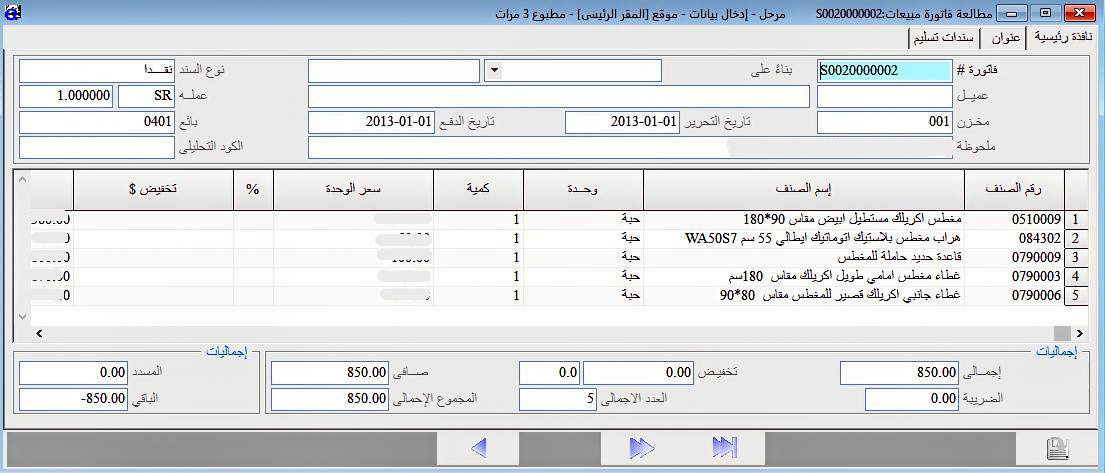
ASWAQ6 includes a full suite of sales documents: Quotations, Sales Orders, Invoices, and Returns. These documents are deeply interconnected.
For example, you can create a Sales Invoice by directly importing a specific order or quotation — ASWAQ6 automatically populates the invoice accordingly.
This seamless linking across documents improves workflow efficiency and reduces errors and manual entry.
Sales Invoice Window in ASWAQ6
ASWAQ6 supports standard document workflows. You can issue invoices and treat them as fully delivered, or generate delivery vouchers after invoicing.
Alternatively, deliveries can be recorded first using stock issue documents, and then invoices are created based on those records — all in line with the operational needs of your business.