The Ajyal-Clinic healthcare ERP system was designed from the ground up to serve decision-makers. Its features and functions cover all the needs of healthcare institutions worldwide, giving you the ability to make sound decisions to manage your business efficiently and effectively.
The Ajyal-Clinic healthcare facility resource planning system offers a high degree of flexibility in managing medications in pharmacies. The system provides a precise mechanism for managing medication entry into pharmacies and tracking its movement within warehouses. The Ajyal-Clinic system also allows the opening of an unlimited number of warehouses for pharmacies or branches and provides multiple reports on the shelf life and profitability of each item. Additionally, the pharmacy system can be linked to the medical system, automatically printing prescriptions from clinics to pharmacies.
The pharmacy unit in the Ajyal-Clinic system also has many advantages, including:
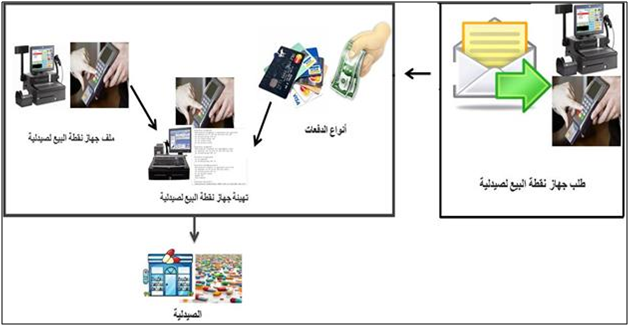
- Payment Type Management: Ajyal Clinic supports multiple payment types to suit each facility’s needs within approved financial procedures, such as cash payments, credit cards, etc.
- Preparing POS device configuration files for pharmacies: The Ajyal-Clinic system prepares POS device requests and configures them with features that suit each pharmacy’s needs in terms of cashier opening, responsible employee, shift, etc.
- Save time: By searching through system functions such as managing orders, returns, and navigating between funds.
Ajyal-Clinic system for planning healthcare facilities’ resources provides effective solutions for managing the pharmacy unit in facilities through the tools and controls available in the system, which work to provide an accurate database on all matters related to the pharmacy in healthcare facility units, in addition to facilitating and speeding up the completion of healthcare transactions through the process of automated linking between the various components of the pharmacy unit in an ambitious step to overcome manual work, as shown in the following illustration (a summary of all the functions performed by the pharmacy unit of the Ajyal-Clinic system):